Follow Us:

News

How to Choose the Best Desktop Type Pad Printing Machine for Your Business

2026-01-19 0 Leave me a message

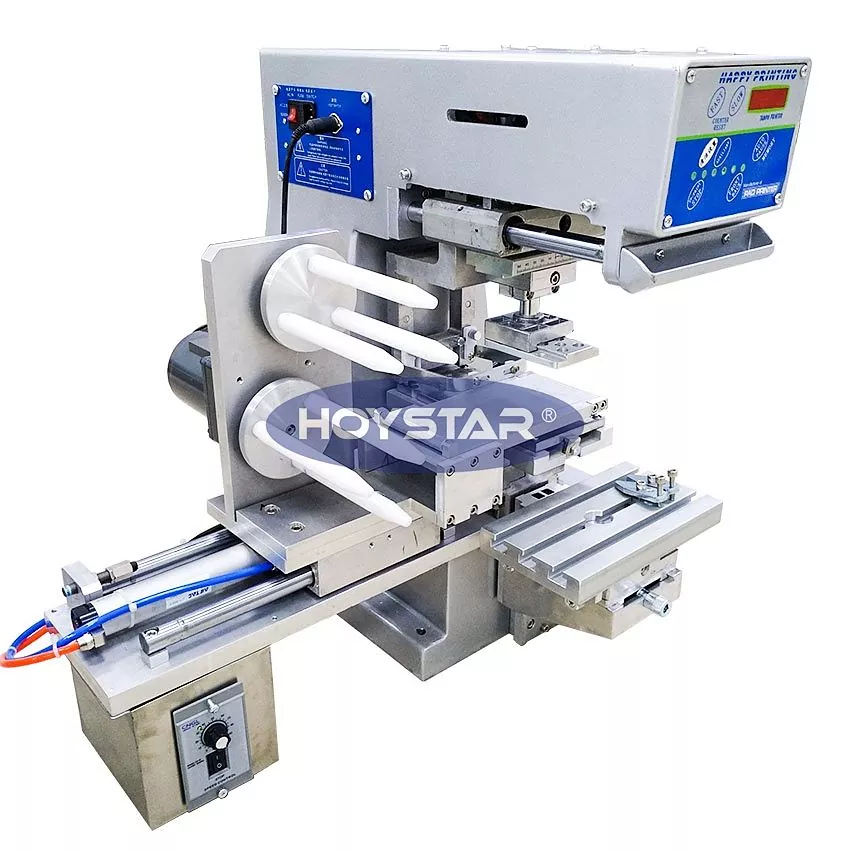
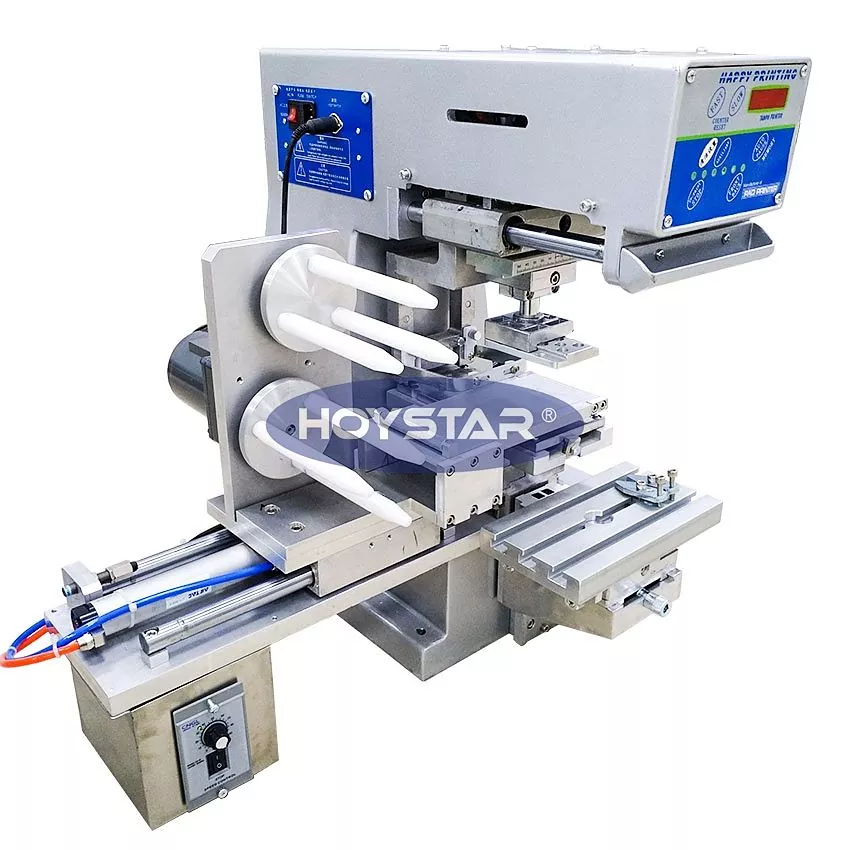
A Desktop Type Pad Printing Machine is a compact yet powerful solution for printing logos, symbols, and detailed graphics on irregular or small-sized products. With increasing demand for customization, short production runs, and precision printing, desktop pad printers have become essential equipment for manufacturers across electronics, medical devices, promotional items, and OEM components.

This comprehensive guide explains how desktop pad printing machines work, what features matter most, how to compare models, and how to select the right machine for your business needs.

Desktop Type Pad Printing Machine

Table of Contents


1. What Is a Desktop Type Pad Printing Machine?

A Desktop Type Pad Printing Machine is a small-footprint pad printer designed for tabletop or bench installation. It uses a silicone pad to transfer ink from an etched printing plate onto a product surface, making it ideal for irregular, curved, concave, or textured objects.

Unlike large industrial pad printers, desktop models focus on flexibility, affordability, and ease of use while maintaining high printing accuracy. They are widely used for logo printing, symbol marking, and fine graphics on plastic, metal, glass, silicone, and rubber parts.


2. How Does a Desktop Pad Printing Machine Work?

  1. The image is etched onto a steel or polymer printing plate.
  2. Ink fills the etched image area.
  3. A silicone pad presses onto the plate and picks up the ink.
  4. The pad transfers the ink onto the product surface.
  5. The ink cures naturally or through heat/UV, depending on ink type.

This indirect printing process allows precise image transfer even on complex shapes, which is why desktop pad printing machines outperform many direct printing methods for small components.


3. Key Advantages of Desktop Type Pad Printing Machines

  • Compact design – Ideal for limited workshop space
  • High precision – Excellent for fine logos and text
  • Cost-effective – Lower investment compared to full-size machines
  • Versatile materials – Works on plastic, metal, glass, rubber
  • Easy operation – Minimal training required

4. Common Applications and Industries

Industry Typical Products Printing Purpose
Electronics Switches, connectors, housings Logos, symbols, serial marks
Medical Devices Syringes, instruments, casings Regulatory marks, branding
Promotional Items Pens, keychains, USB drives Custom logos
Automotive Buttons, knobs, interior parts Functional markings

5. Key Factors to Consider When Choosing a Desktop Pad Printer

5.1 Printing Accuracy and Repeatability

Look for machines with stable mechanical structures and precise pad movement systems. Repeatability is crucial for batch consistency.

5.2 Ink Cup and Plate Size

The size of the ink cup and printing plate determines maximum image dimensions. Always match machine capacity with your product size.

5.3 Operation Type

  • Manual operation – lower cost, higher labor involvement
  • Semi-automatic operation – better efficiency and consistency

5.4 Material Compatibility

Ensure the machine supports inks suitable for your product material, such as ABS, silicone, metal, or glass.


6. Manual vs Semi-Automatic Desktop Pad Printing Machines

Feature Manual Semi-Automatic
Production Speed Low Medium to High
Consistency Operator dependent Stable and repeatable
Cost Lower Moderate
Recommended Use Prototyping, small runs OEM and small batch production

7. Technical Specifications Comparison Table

Specification Typical Range
Printing Speed 600–1200 cycles/hour
Max Printing Area 80 × 80 mm
Power Supply 110V / 220V
Control System Pneumatic or Electric

8. Maintenance, Durability, and Long-Term Cost

A high-quality desktop pad printing machine should offer easy cleaning, durable pads, and readily available spare parts. Regular maintenance includes pad cleaning, ink cup inspection, and plate replacement.

Choosing a reliable supplier reduces downtime and lowers total cost of ownership over the machine’s lifespan.


9. Why Choose a Professional Manufacturer Like HOYSTAR?

Working with an experienced manufacturer such as HOYSTAR ensures not only stable machine performance but also professional technical support, customization options, and compliance with international quality standards.

HOYSTAR desktop type pad printing machines are designed to meet the real-world needs of OEM manufacturers, combining precision engineering with user-friendly operation.


10. Frequently Asked Questions (FAQ)

Q1: What products are best suited for desktop pad printing machines?

Small to medium-sized products with uneven or curved surfaces, such as plastic housings, buttons, and promotional items.

Q2: Can desktop pad printers handle multi-color printing?

Yes, but multi-color printing typically requires multiple printing cycles or machines.

Q3: How long does a silicone pad last?

Pad lifespan depends on usage and ink type but typically ranges from several weeks to months under normal operation.

Q4: Is operator training required?

Basic training is sufficient, and most desktop pad printing machines are designed for intuitive operation.


Final Thoughts

Choosing the right Desktop Type Pad Printing Machine can significantly improve product quality, branding consistency, and production efficiency. By evaluating your application needs, production volume, and technical requirements, you can select a machine that delivers long-term value.

If you are looking for a reliable, cost-effective, and professional desktop pad printing solution, working with an experienced manufacturer makes all the difference. Contact us today to explore how HOYSTAR can support your printing projects with customized solutions and expert guidance.

Related News
Leave me a message
X
We use cookies to offer you a better browsing experience, analyze site traffic and personalize content. By using this site, you agree to our use of cookies. Privacy Policy
Reject Accept